CLI — API & Collection Commands
Installation
mcp-http ships as a cross-platform .NET global tool and runs on Windows, Ubuntu (x64), and macOS (Apple Silicon / x64). Requires the .NET 10 SDK.
Install from NuGet.org
dotnet tool install -g Garrard.Mcp.Explorer.Cli
Install from a local build
  # Pack
dotnet pack src/Garrard.Mcp.Explorer.Cli -c Release -o ./nupkg

# Install
dotnet tool install -g Garrard.Mcp.Explorer.Cli --add-source ./nupkg

# Update an existing installation
dotnet tool update -g Garrard.Mcp.Explorer.Cli --add-source ./nupkg
First Run & Banner
Running mcp-http with no arguments, --help, or --version displays the ASCII art banner and version number.
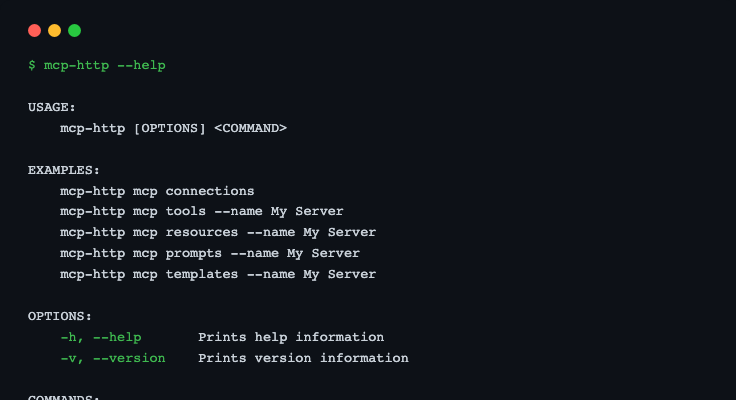
mcp-http --help
Global Option: --data-path
Pass --data-path <dir> before any subcommand to point the CLI at a different data directory. This is useful when the app runs inside Docker while the CLI runs on the host.
mcp-http --data-path "/home/user/McpExplorerData" http api list
Default data paths by platform:
| Platform | Default path |
|---|---|
| macOS | ~/Library/Application Support/McpExplorer |
| Linux | ~/.local/share/McpExplorer |
| Windows | %LOCALAPPDATA%\McpExplorer |
Tip: The 🖥 Copy CLI command button in the browser always includes
--data-pathsourced from the running API, so copied commands always point at the correct directory.
http runbook (NEW)
Execute a YAML-declared HTTP runbook to invoke endpoints with validation, assertions, optional scheduling, and chained step inputs.
  mcp-http http runbook --file ./http-runbook.yaml

# Validate only
mcp-http http runbook --file ./http-runbook.yaml --validate-only
Options:
| Option | Description |
|---|---|
--file <path> | Path to a YAML runbook file |
--validate-only | Validate YAML syntax + structure and exit without invoking endpoints |
Runbook steps can reference endpoint name (exact/partial) or endpointId. You can either use saved API definitions or declare inline runbook connections (with defaultConnection support). Steps can chain values with template tokens like {{ steps.first.body.value }}, and use schedule settings (repeat, everySeconds, forSeconds) for repeated execution. Add assert blocks to evaluate result success/failure and use continueOnAssertFailure (runbook or step level) to continue or stop on assertion failure.
http api Commands
http api list
List all saved HTTP API definitions.
mcp-http http api list
Prints a table of all defined endpoints — name, base URL, method, and path.
http api invoke
Invoke a named HTTP API endpoint and display the response with an inferred schema.
  # By name (partial match)
mcp-http http api invoke --name "My API"

# Replace host.docker.internal with localhost
mcp-http http api invoke --name "My API" --use-localhost

# With a custom data directory
mcp-http --data-path "/path/to/data" http api invoke --name "My API"
Options:
| Option | Description |
|---|---|
--name <text> | Partial name match against saved definitions |
--id <id> | Exact endpoint ID |
--use-localhost | Replace host.docker.internal with localhost in the base URL |
--bookmark | Save a snapshot bookmark after invocation |
--label <text> | Label for the bookmark (requires --bookmark) |
Output: HTTP status code, latency, full response body panel, and an inferred JSON schema panel. The invocation is recorded in history with Source = CLI.
http api compare
Invoke an endpoint and compare the response schema against its saved baseline snapshot. Useful in CI to detect breaking API changes.
  mcp-http http api compare --name "My API"

# Exit with non-zero code on breaking changes
mcp-http http api compare --name "My API" --fail-on-breaking
Options:
| Option | Description |
|---|---|
--name <text> | Partial name match |
--id <id> | Exact endpoint ID |
--snapshot-id <id> | Compare against a specific saved snapshot |
--fail-on-breaking | Exit code 1 if breaking schema changes are detected |
--degradation-multiplier <n> | Flag latency as degraded when it exceeds baseline × n (default: 2) |
Output: A diff table showing added (+), removed (-), and changed (~) schema properties, plus a summary line.
http api history
Show recent invocation history for one or all endpoints.
  # History for a named endpoint
mcp-http http api history --endpoint "My API"

# Limit to last 20 entries
mcp-http http api history --endpoint "My API" --limit 20

# All endpoints
mcp-http http api history
Options:
| Option | Description |
|---|---|
--endpoint <text> | Filter by endpoint name |
--limit <n> | Maximum number of entries to show (default: 20) |
http api export
Export selected API definitions to an encrypted file for sharing or backup.
mcp-http http api export --output export.json --password secret
Options:
| Option | Description |
|---|---|
--output <file> | Output file path |
--password <text> | Encryption passphrase (AES-256) |
http api import
Import API definitions from an encrypted export file.
mcp-http http api import --file export.json --password secret
Options:
| Option | Description |
|---|---|
--file <file> | Path to the export file |
--password <text> | Decryption passphrase |
Imported definitions are merged with existing ones — existing IDs are not overwritten.
http collection Commands
http collection list
List all saved collections.
mcp-http http collection list
Prints a table showing collection name, description, and endpoint count.
http collection run
Run all endpoints in a named collection, compare each response against its saved baseline, and print a summary table.
  # Basic run
mcp-http http collection run --name "Regression Suite"

# Fail CI on breaking changes
mcp-http http collection run --name "Regression Suite" --fail-on-breaking

# Use localhost URLs (when API was saved with a Docker base URL)
mcp-http http collection run --name "Regression Suite" --use-localhost --fail-on-breaking

# With a custom data directory
mcp-http --data-path "/path/to/data" http collection run --name "Regression Suite" --fail-on-breaking
Options:
| Option | Description |
|---|---|
--name <text> | Collection name (partial match) |
--use-localhost | Replace host.docker.internal with localhost |
--fail-on-breaking | Exit code 1 if any endpoint has a breaking schema change |
Output: A summary table with one row per endpoint — status code, latency, result label, and schema diff badges. Run stats (duration, passed/failed counts, per-endpoint summaries) are persisted to the data store so they appear in the browser’s Run History table.
Exit Codes
| Code | Meaning |
|---|---|
0 | All invocations succeeded (and no breaking changes when --fail-on-breaking) |
1 | One or more invocations failed, or breaking changes detected with --fail-on-breaking |